
Test Results with Excel 2003
Pastings directly from excel yields the following results for the following table:
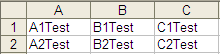
And when converted into HTML by FCKeditor:
<table width="192" cellspacing="0" cellpadding="0" border="0" style="border-collapse: collapse; width: 144pt;" x:str="">
    <col width="64" span="3" style="width: 48pt;"></col>
    <tbody>
        <tr height="17" style="height: 12.75pt;">
            <td width="64" height="17" style="height: 12.75pt; width: 48pt;">A1Test</td>
            <td width="64" style="width: 48pt;">B1Test</td>
            <td width="64" style="width: 48pt;">C1Test</td>
        </tr>
        <tr height="17" style="height: 12.75pt;">
            <td height="17" style="height: 12.75pt;">A2Test</td>
            <td>B2Test</td>
            <td>C2Test</td>
        </tr>
    </tbody>
</table>
After some experimentation I have found the problem attribute to be the the x:str tag on the main <table> The following HTML works like a charm, when pasted directly in:
<table width="192" cellspacing="0" cellpadding="0" border="0" style="border-collapse: collapse; width: 144pt;">
    <col width="64" span="3" style="width: 48pt;"></col>
    <tbody>
        <tr height="17" style="height: 12.75pt;">
            <td width="64" height="17" style="height: 12.75pt; width: 48pt;">A1Test</td>
            <td width="64" style="width: 48pt;">B1Test</td>
            <td width="64" style="width: 48pt;">C1Test</td>
        </tr>
        <tr height="17" style="height: 12.75pt;">
            <td height="17" style="height: 12.75pt;">A2Test</td>
            <td>B2Test</td>
            <td>C2Test</td>
        </tr>
    </tbody>
</table>
Test Results with Word 2003
The same problem happens when data gets pasted from a Word document as well, consider the following document:
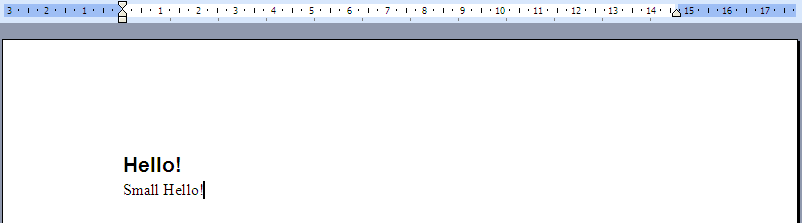
When converted into HTML by FCKeditor, it yields the following:
<h1>
    <span lang="EN-US" style="">Hello! <o:p></o:p></span>
</h1>
<p class="MsoNormal">
    <span lang="EN-US" style="">Small Hello!<o:p></o:p></span>
</p>
The problem here lies in the <o:p> tags, removing them causes no errors to occur:
<h1>
    <span lang="EN-US" style="">Hello!</span>
</h1>
<p class="MsoNormal">
    <span lang="EN-US" style="">Small Hello!</span>
</p>
However, while no errors occur, the contents do not get formatted properly. This is due to the use of h1 tags, when using the following HTML, everything works as expected:
<h2>
    <span lang="EN-US" style="">Hello!</span>
</h2>
<p class="MsoNormal">
    <span lang="EN-US" style="">Small Hello!</span>
</p>
Also, FCKeditor has a ‘Paste from Word’ Function. When used, it works correctly.
Overall Ideas / Conclusions
Judging from the tags causing the errors, it seems to come down to a common factor: Expat chokes on HTML attributes containing a ‘:’. To test this theory, I started the GUI editor and changed the page source to:
<h1 a:b="test">hi</h1>
The result, as expected, was the ExpatError: unbound prefix: line 376, column 6, one that has been encountered many times.